Sky Sphere 3D Arcade
Reviews
💡Sky Sphere 3D Arcade delivers a polished, family-friendly experience with smooth sphere rolling mechanics and creative obstacle courses. The two-player split-screen mode adds competitive fun without any inappropriate content. Collecting coins to unlock new sphere skins provides a rewarding progression system. The game is optimized for mobile and tablet, making it perfect for short, casual play sessions. Its sky-themed visuals are appealing, and the increasing difficulty keeps players engaged without becoming frustrating.
Description
Game Introduction
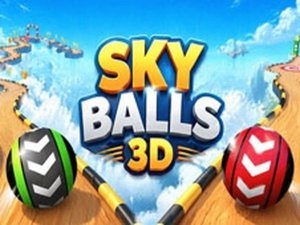
Sky Sphere 3D Arcade is a hypercasual arcade game where players roll a sphere through obstacle courses set high in the sky. The core objective is to reach the end of each level without falling off or being stopped by traps. The courses feature moving platforms that require balance and timing. The game offers both single-player and two-player modes, with the latter allowing friends to race on the same course. It is designed for quick, family-friendly sessions with no violent or inappropriate content.
How to Play
Players control a sphere using standard input devices such as a mouse or keyboard. The main actions involve rolling forward and steering left or right to avoid obstacles like crates and traps. Some obstacles can be smashed through by rolling fast, while others must be dodged entirely. Coins are scattered on each level and can be collected by rolling over them. In two-player mode, each player selects their own sphere and races to the finish line; the first to cross wins that round. Note that two-player mode is available only on computers.
Game Features
Features include a variety of obstacle courses with increasing difficulty, moving platforms, and power-ups such as speed boosts, invincibility, and jumping abilities. Players can collect coins to unlock new sphere skins. The game supports both single-player and two-player split-screen racing modes. It is optimized for mobile and tablet devices, with casual and hypercasual gameplay suitable for short play sessions. The 3D visuals and sky-themed setting provide an engaging environment.
Tips for Success
Practice balancing on moving platforms to avoid falling. Learn the layout of each level to anticipate obstacles and traps. Use speed boosts strategically to smash through breakable barriers. Collect as many coins as possible to unlock new sphere skins. In two-player mode, focus on maintaining steady progress rather than rushing, as falling can cost valuable time. Regular practice will help improve reaction times and overall performance.
Compatibility
Faq
Is Sky Sphere 3D Arcade available on both mobile and desktop?
Can I play Sky Sphere 3D Arcade offline?
Are there in-app purchases in Sky Sphere 3D Arcade?
How many sphere skins can I unlock in Sky Sphere 3D Arcade?
Does Sky Sphere 3D Arcade have any age restrictions?
Can I play Sky Sphere 3D Arcade with a controller?
Related Games

Flight Simulator EVO Online
Flight Simulator EVO Online

Emergency Response Driving Simulator 3D
Emergency Response Driving Simulator 3D
Color Sort Puzzle: Sorting Challenge
Color Sort Puzzle: Sorting Challenge

Tap Goal Soccer Puzzle
Tap Goal Soccer Puzzle

School Stealth Puzzle Adventure
School Stealth Puzzle Adventure

Retail Store Tycoon Simulator
Retail Store Tycoon Simulator

Pocket Universe Idle Builder
Pocket Universe Idle Builder