 Mahjong Racer Games
Mahjong Racer Games
Mahjong Racer Games
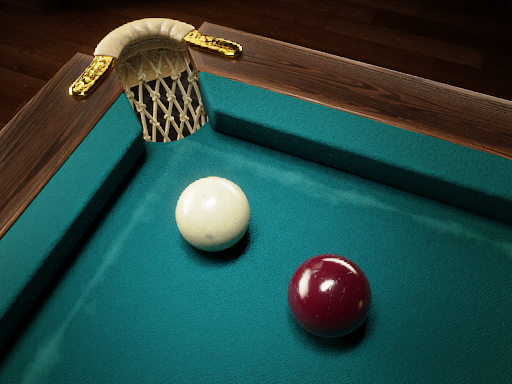
Russian Billiards Sports Simulator offers an authentic pool experience with its 3D graphics and accurate physics. The ability to practice against a virtual opponent or compete online adds flexibility. Customization options for tables and cues let players personalize their setup. The sight tool and two view modes improve shot accuracy, making it suitable for both beginners and experienced players.
Russian Billiards Sports Simulator brings the classic pool hall experience to your screen with realistic 3D graphics and smooth physics. This sports simulation is designed for players of all skill levels, from those learning the basics to experienced players seeking worthy rivals. You can choose to practice against a virtual opponent or go online to compete with real players from around the world. The game also features a store where you can customize your table, cue, ball colors, and other accessories to match your personal style. Two view modes and a sight tool help you line up shots with accuracy. Whether you are playing for fun or aiming to improve, this game offers a clean and engaging billiards experience.
To start, select your preferred mode: virtual rival for solo practice or online for real-time matches. Use your mouse or touch controls to aim the cue. The sight tool assists you in aligning shots for better precision. Choose between two view modes to find the best angle for each shot. Take your time to plan your moves and strike the cue ball to pocket the colored balls. The game follows standard Russian billiards rules, where you aim to sink all your assigned balls before your opponent. Customize your table, cue, and accessories from the store to enhance your gameplay. Practice against the virtual rival to improve your skills, then challenge online opponents for a real test of your abilities. Enjoy the realistic physics and smooth controls as you play.
Realistic 3D graphics that create an immersive pool hall atmosphere. Two play modes offer flexibility for solo practice or competitive online matches. A variety of customization options in the store, including interior designs, ball colors, cues, and accessories. An accurate sight tool and two view modes help you line up shots with consistency. Smooth touch and mouse controls make aiming and striking easy. Multiplayer functionality allows you to challenge friends or other players worldwide.
To improve your game, start by practicing regularly against the virtual rival to master the physics and aiming mechanics. Use the sight tool and experiment with both view modes to find what works best for you. Plan your shots carefully, considering angles and ball placement. Customize your equipment in the store to suit your style, which can boost confidence. When playing online, stay patient and observe opponents' strategies. Consistent practice and a calm mindset are key to becoming a skilled player.









Comments
Sign in to comment
You must be logged in before posting a review or rating.
No account? Create one
No comments yet. Be the first to comment!